
Before You Paste: What to Keep Out of an Unapproved AI Tool
The short answer
Keep passwords, access codes and private customer, employer or household records out of an unapproved AI tool. First establish whether the particular tool, account and information are allowed for your task. When practicing, use invented details or ask for a blank structure you can fill in privately.
An assistant that can rewrite a document is not automatically an approved place to send that document. Being able to open a file is also different from being authorized to share it with another service.
Start with the task, not the attachment
You have a rough note from a long shift and want it to sound clearer. Uploading the entire job packet may feel faster than deciding which parts are needed. Instead, describe the output you want before choosing the input.
For a handoff, perhaps you need headings for completed work, unresolved questions and the next responsible person. You can ask for those headings without sending names, site details or the work record. For a household filing project, perhaps you need folder labels. You can request a filing structure without uploading account statements.
Use this sentence: “I need help creating ___, and the minimum information needed is ___.” If the second blank starts becoming a whole personnel file, customer history or financial statement, reconsider whether a template would accomplish the useful part.
NIST identifies privacy risks involving unauthorized disclosure, use and re-identification of sensitive information in generative AI. Its profile is organizational risk guidance, not a certification that a particular app is safe for your records. NIST Generative AI Profile, section 2 and privacy-related actions.
A practical stop-and-check list
This table is an FSF screening aid for unfamiliar or unapproved services. It does not override an employer's approved process or establish legal permission to use particular data.
| What is in the material? | Why pause? | A useful alternative for practice |
|---|---|---|
| Password, recovery code or access token | It is an access secret, not useful writing context | Replace it with “[access details kept separately]” |
| Customer name, address, phone number or account reference | It connects the task to a person or account | Use a fully fictional customer and location |
| Internal pricing, bids, drawings or restricted procedures | You may not be authorized to send business information to another provider | Ask for a blank format with invented inputs |
| Employee review, health details or identification document | The record can contain highly sensitive personal information | Request a generic checklist of questions without the record |
| Bank statement, tax form or household account document | It may include identifiers and information about other people | Describe the filing task without uploading the document |
| Job-site or household photo | Labels, badges, screens and background details may reveal more than the main subject | Use a staged practice photo or a text description without private details |
The alternative is not a magic anonymization procedure. It is a way to practice without needing the real record in the first place. If the actual task genuinely requires sensitive information, use the approved workflow and its responsible owner.
Removing a name may not remove the identity
Consider this fictional note: “The only night-shift supervisor at the north facility requested leave after Tuesday's incident.” It contains no name. Within a workplace, it might still identify a person through the role, location and event.
A practice prompt could instead say: “Create a neutral follow-up checklist for a fictional scheduling request. Leave fields for the responsible person, date and next action.” That removes the real event from the task rather than merely replacing a name with an initial.
The same issue arises at home. Replacing your name on a bill does not necessarily remove the address, account number, barcode or details about another household member. Do not send a document to an unfamiliar AI service simply to ask whether it contains anything private; that would expose the document before the check.
Check the destination as carefully as the information
At work, ask which account and tool are approved for the particular information involved. A personal login on a work computer is still a separate account. An approved product name alone does not explain every permitted task or data category.
Useful questions for your responsible workplace contact are:
- Is this tool and account approved for this task and information?
- Are attachments, connected folders or additional integrations allowed?
- Where should the original and checked output be stored?
- What is the reporting process if something is shared by mistake?
Do not assume a paid tier, a private-looking conversation or a statement about model training answers all those questions. Check current written terms and organizational settings for the actual service. This article does not compare providers or make claims about any provider's retention policy.
NIST's broader AI Risk Management Framework is voluntary and supports evaluating risks in context. FSF's practical recommendation is to establish permission and handling rules before trying a real work record in a new workflow. NIST AI Risk Management Framework.
Try the useful part with a fictional example
Here is a practice prompt written for this article. It is an illustration, not a report of a test run or a product's measured performance:
Create a blank service-job follow-up template with sections for work requested, work completed, unresolved questions and next action. Use bracketed placeholders. Do not invent a diagnosis, customer commitment, price or completion date. Include a place for a person to verify the final record.
Review what comes back. Does it introduce a claim that the work was completed? Does it make a promise the original request did not authorize? Does it need fewer fields to be useful after a shift?
If the structure helps, copy the blank template into the approved system. Fill in the real details there under the rules for that system. The AI exercise can succeed without ever receiving the real customer record.
At home, change the task to “create a folder checklist for household paperwork.” Keep the actual documents in the storage system you have chosen and secured. A list of folder names does not require an account number or an image of a tax form.
If you already sent something you should not have
Stop adding information. Follow your employer's incident-reporting process or contact the person responsible for the affected account or records. Record the service, approximate time and type of information involved without unnecessarily copying the sensitive material again.
Do not assume deleting a visible conversation proves the information has been removed everywhere. Let the responsible team assess the service's controls and what response is needed. If an access secret was involved, promptly contact the account or security owner through the established process.
For household information, use the relevant provider's official support or security process. The correct response depends on what was exposed; this article does not establish breach-notification duties or individualized legal advice.
Make the pause repeatable
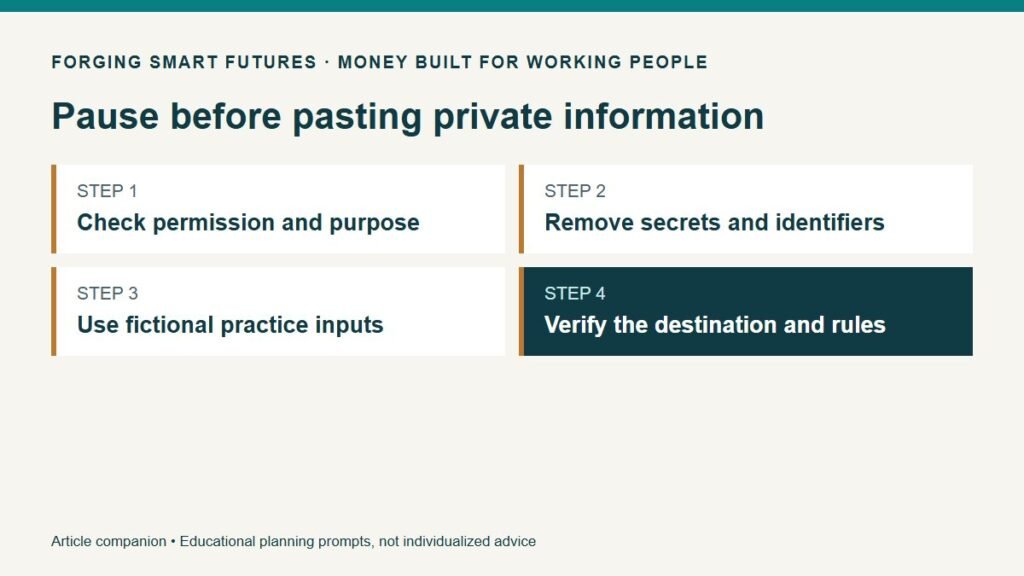
Before each new task, check the purpose, permission, minimum information and destination. Then check the output before relying on it. Repeat the assessment when you change accounts, attach a new kind of record or enable an integration.
Use the FSF Before You Paste checklist as a short reminder. Explore the AI for Work & Real Life hub for practical tasks that can begin with fictional or non-sensitive inputs.
General education only, not individualized legal, cybersecurity, financial or workplace compliance advice. Follow the applicable workplace rules and responsible professional guidance. Prepared with AI assistance; reviewed for publication by the FSF publisher.
Editorial attribution: Paul Foster
Published: September 10, 2026 Last reviewed: September 10, 2026
Sources & References
- https://nvlpubs.nist.gov/nistpubs/ai/NIST.AI.600-1.pdf
- https://www.nist.gov/itl/ai-risk-management-framework
Put this into practice
Use AI for drafts and organization while keeping facts and judgment with you. Free AI for Work & Real Life checklist — no membership required.
Related decisions
- Use AI to Plan Groceries Around Your Shifts—Then Check the Cart Yourself
- Use AI to Organize Household Paperwork Without Uploading Your Private Records
- AI at Work: Five Useful Tasks to Try Before Paying for Another App
Expanded member resource: AI for Work and Real Life Practice Workbook. Guided exercises with local save, reopen and print controls. Worksheet answers are not automatically calculated. Compare free resources and FSF membership benefits.
Human-reviewed, AI-assisted content; how FSF creates articles.