
How to Automate Saving Without Overdrawing a Small Paycheck
The short answer
Automate only an amount that fits the cash remaining after near-term commitments, and choose timing based on when pay is actually available. Start small, monitor the first transfers and know how to pause them. If income is too uncertain for a fixed transfer, automate a reminder to review the balance instead.
Automation is a convenience. It cannot make an unaffordable transfer affordable or guarantee that a paycheck arrives before a scheduled withdrawal.
Find the money that is genuinely uncommitted
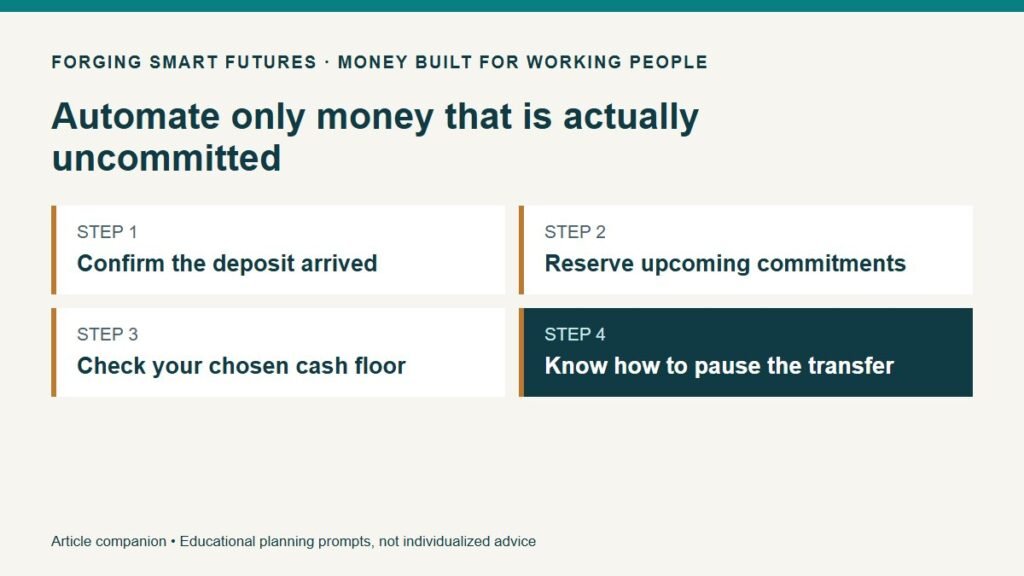
An account balance may include money for rent, a payment that has not posted or spending needed before the next check. Before choosing a savings amount, write down those commitments and the dates they will leave.
Consider a fictional payday balance of $900. Before the next deposit, $650 is needed for listed bills and $180 for groceries and transport. That leaves $70, before any additional cushion you choose. A $100 automatic transfer creates a $30 shortfall in this simplified plan.
If the deposit is $80 smaller than expected, the plan is already $10 short before saving anything. That is a signal to review spending, timing or income; it is not a reason to force the transfer because you promised yourself to save every payday.
Choose between three routines
| Routine | When it may fit | What needs checking |
|---|---|---|
| Fixed recurring transfer | Your lower-pay periods consistently support the amount | Deposit timing, upcoming bills and account terms |
| Payroll split, if available | The employer supports it and your remaining deposit covers commitments | Setup timing and what happens when pay falls |
| Payday review reminder | Amounts or deposit dates vary substantially | Whether you follow through on the review |
The CFPB describes recurring transfers and possible payroll splits, while warning readers to watch balances to avoid overdraft fees. It also notes that the amount and frequency can change with the situation. CFPB emergency-saving guide.
Ask your institution or payroll team how the actual arrangement works. A scheduling screen that accepts a date does not prove the money will be available by that time. Check weekends, holidays and transfer processing rules with the providers involved.
Use a floor as a decision rule, not a guarantee
You might decide to keep $50 beyond the commitments in the fictional $900 example. With $70 uncommitted, that leaves a maximum of $20 for the transfer under those assumptions. That $50 floor is invented for this example; it is not an FSF recommendation.
Write your own rule in ordinary language: “After this deposit is available, review bills and necessary spending through the next payday. Transfer only the amount above those commitments and my chosen cushion.”
Do not confuse this manual rule with an automatic bank feature. Some products may offer balance-based transfers, but their definitions and safeguards need a separate review. A displayed “safe to save” number is still something to understand, not a substitute for checking your obligations.
Watch the first few cycles
Record the intended transfer date, actual transfer date and balance afterward. Check whether a bill posted later than expected. If you repeatedly move the same savings back to checking for predictable expenses, review whether the transfer is too large or whether those expenses need their own reserve.
Moving savings back for a necessary expense is not a moral failure. The useful question is whether it was an unexpected need or a known bill that the plan omitted. That distinction tells you what to adjust.
An initial test could use a smaller amount while you verify the process. Do not assume the lowest selectable transfer is harmless; even a small amount can matter when the checking balance is tight.
Separate emergency saving from money for known bills
A tire replacement expected soon or an annual insurance bill already on the calendar needs a place in the plan. Label money by purpose so the same dollars are not counted as both an emergency fund and next month's bill payment.
You do not necessarily need multiple paid accounts to do this. A clear written allocation can help, provided the total matches the actual funds and you understand any account restrictions. This article does not recommend a particular bank or savings product.
Know the pause process before you need it
Find the controls for changing or stopping future transfers. Check whether a pending transfer can still be changed and whether payroll changes require lead time. Do not cancel a payment you owe while intending to pause a savings transfer; identify the transaction carefully.
When overtime ends, hours are cut or a large bill approaches, reassess the routine before the next scheduled transfer. If the setup does not let you react in time, a manual payday decision may be a better fit for that period.
Your first action can be modest: put a balance-and-bills review on the next payday. Use the FSF budget planner to check the broader spending plan, then verify actual dates before moving money. A sustainable routine matters more than an impressive transfer that has to be reversed every week.
General education only, not individualized financial, investment, tax, legal or credit advice. Examples are fictional and depend on the stated assumptions. Prepared with AI assistance by FSF Editorial Team; reviewed for publication by the FSF publisher.
Editorial attribution: Paul Foster
Published: September 10, 2026 Last reviewed: September 10, 2026
Sources & References
Put this into practice
Separate true surprises from bills you can see coming. Free Saving checklist — no membership required.
Related decisions
- Paid Every Two Weeks? Build a Bill Calendar That Fits
- How Much Emergency Savings Do You Need When Your Hours Can Be Cut?
- Build a Cash Plan Before a Seasonal Shutdown
Expanded member resource: Cash Cushion and Planned Expenses Workbook. Guided exercises with local save, reopen and print controls. Worksheet answers are not automatically calculated. Compare free resources and FSF membership benefits.
Human-reviewed, AI-assisted content; how FSF creates articles.