
Bookkeeping and Invoicing Software for Your First Service Business
The short answer
Choose software around the work you need to complete: quote a job, invoice it, record payment, preserve evidence and reconcile the money. Test that complete path before comparing long feature lists. A simple tool you maintain is more useful than an expensive system with six months of unexplained transactions.
This article provides a test protocol, not a hands-on review of named products. Check current pricing, feature limits, privacy terms and export capabilities directly with each provider before buying.
Identify the problem you are paying to solve
Invoicing answers what the customer owes and whether it has been paid. Bookkeeping organizes the wider record of income, expenses, assets and other transactions. Some products combine these functions; some do not. A professional-looking invoice does not mean your bank records are reconciled or your tax treatment is correct.
Write down the specific failure in your current method. Examples include forgetting to invoice after a weekend job, spending too long matching payments, losing receipts or being unable to hand usable records to a preparer. If you cannot identify the problem, a subscription may just create another bill.
IRS recordkeeping guidance emphasizes clear records and supporting documents rather than requiring one particular commercial product. IRS records guidance.
Run one fictional job through the system
Use invented customer information in a trial. Create a $400 quote. Convert the accepted scope to an invoice. Record a $100 deposit and then a $300 balance payment. Check that the invoice shows zero outstanding, while the deposit is not counted again as another $100 of sales.
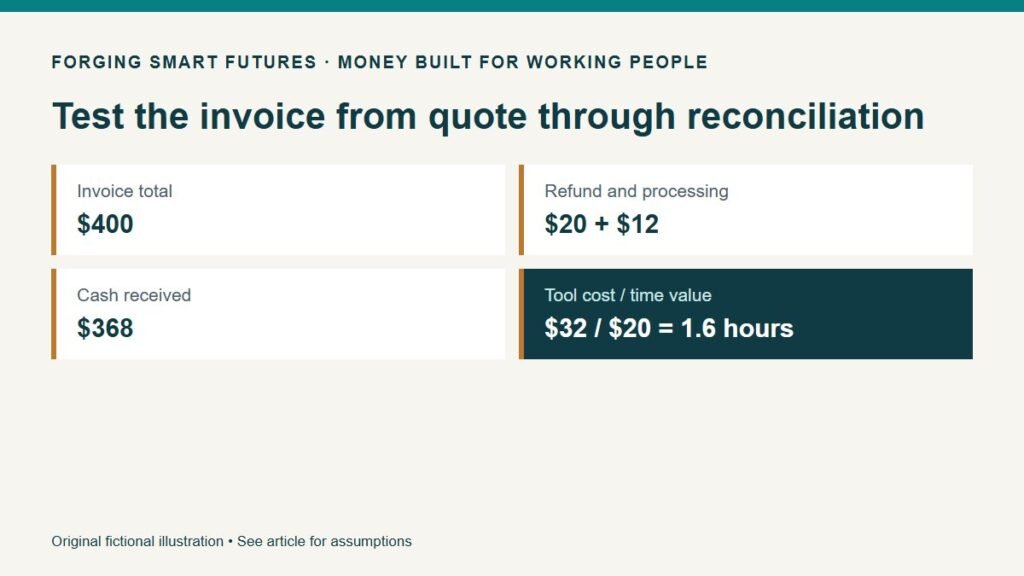
Add a separately documented $20 refund and a fictional $12 processing fee. Reconcile the resulting $368 cash receipt from $400 less $20 less $12. Ask whether the system makes the differences understandable without a separate handwritten explanation.
Then test a change: the customer approves an additional $50 of work. Can you show the approval, update what is owed and retain the original trail? The point is to find workflow gaps, not to force every accounting detail into a particular treatment without professional input.
Test the handoff and the exit
Export invoices, customer balances, transactions and supporting records. Open the exports outside the product. Check that dates, amounts and identifiers survived. Confirm what remains available after cancellation and whether access for a bookkeeper costs extra.
Try the phone workflow where you expect to use it. Can you capture a receipt after a field visit without entering sensitive customer data into an unapproved system? Can you find that receipt a week later? A successful demo on a desktop is not proof that the process fits a rushed evening after work.
Compare the full cost with the manual alternative
In a fictional comparison, the subscription costs $24 per month. Additional payment costs compared with the current arrangement average $8. The incremental cash cost is $32 monthly, or $384 over twelve months if those assumptions hold.
Suppose the tool saves forty-five minutes a month after including corrections and review. At a chosen planning value of $20 per hour, that time is valued at $15, below the $32 cash cost. The simple time-only break-even is 1.6 hours per month. This does not mean your free time is worthless or that $20 is everyone's hourly value. It separates assumptions from the sales pitch.
Other benefits may justify the cost, such as a more reliable invoice process, but record why. Do not automatically count “faster payment” as extra revenue unless you have evidence that it changes actual outcomes.
Review before trusting automation
Bank feeds can reduce entry work, but inspect duplicates, transfers, refunds and suggested categories. A confidently labeled transaction can still be wrong. Establish a regular reconciliation and keep a list of items needing your accountant's judgment.
Start with the smallest plan that passes your required workflow. Reassess when transaction volume, users or reporting needs change. Record the price and date of the comparison because introductory offers and included features can change.
Your next action
Run the fictional invoice test before entering real customer data. Use FSF's cash-flow explanation to distinguish profit from collection timing, and the Resources page for available planning tools. Planning resources supplement, rather than replace, your accounting system.
General education, not individualized accounting, tax, legal or financial advice. Prices and transactions are fictional. No product testing, affiliate relationship or guaranteed time saving is claimed.
Editorial attribution: Paul Foster
Published: September 10, 2026 Last reviewed: September 10, 2026
Sources & References
- https://www.irs.gov/businesses/small-businesses-self-employed/what-kind-of-records-should-i-keep
Put this into practice
Test demand and cash needs before committing to recurring costs. Free Starting a Business checklist — no membership required.
Related decisions
- DIY Filing or a Business Formation Service? Know What You Are Buying
- Find Your First Service Customers Without Quitting Your Job
- A Profitable Month Can Still Run Out of Cash: Understand Receivables
Expanded member resource: First Service Business Planning Workbook. Guided exercises with local save, reopen and print controls. Worksheet answers are not automatically calculated. Compare free resources and FSF membership benefits.
Human-reviewed, AI-assisted content; how FSF creates articles.